Presenters: Rachel Vourlas Schacht (rvourlas@huntington.org, Manager of Library Education, The Huntington), Raul Almada (ralmada@whittiercity.net, Whittier CSD), Christine Quach (prog coordinator, educe div, The Huntington), Bill Deverell (deverell@usc.edu, Professor of History/Director of Huntington-USC Institute on California and the West), David Igler (digler@uci.edu, Hist Dept, UCI), Dr. Catherine Allgor (Dir of Ed at Huntington), Peter Blodgett (pblodgett@huntington.org, Curator of West. Americana), Dr. Eric Steiger (esteiger@uci.edu, Environmental and Transnational history, UCI), Karina White (Senior Exhibition Developer, The Huntington), Kitty Connolly (Botanical Interpretation Manager, The Huntington).
Primary Sources: Documents created at the time being studied. Maps, photos, letters, recordings, artifacts, etc.
Math: Consider using George Washington's 14 yr old math notes. Very motivating.
Lesson plan from Raul Almada in Tools: Girls' playground, web source: http://www.loc.gov/pictures/resource/det.4a12326/

Treat PS items with respect; it's time traveled from long ago and survived; most things haven't. Pass around personal realia if you have it. Don't be afraid to say, "I never thought of that" with student comments.
Put students in the place of the primary source authors… "How would you feel? What would you do?"
Historians take pieces from the past and make meaning from them. They also apply them to the present. Primary vs. secondary sources: Books of history, textbooks, well-written websites are all products on primary sources. Good secondary sources are great at compiling primary source information and making it digestible. A document is always a primary source for the time in which it was created (Gone with the Wind: movie production in the '30s, etc.).
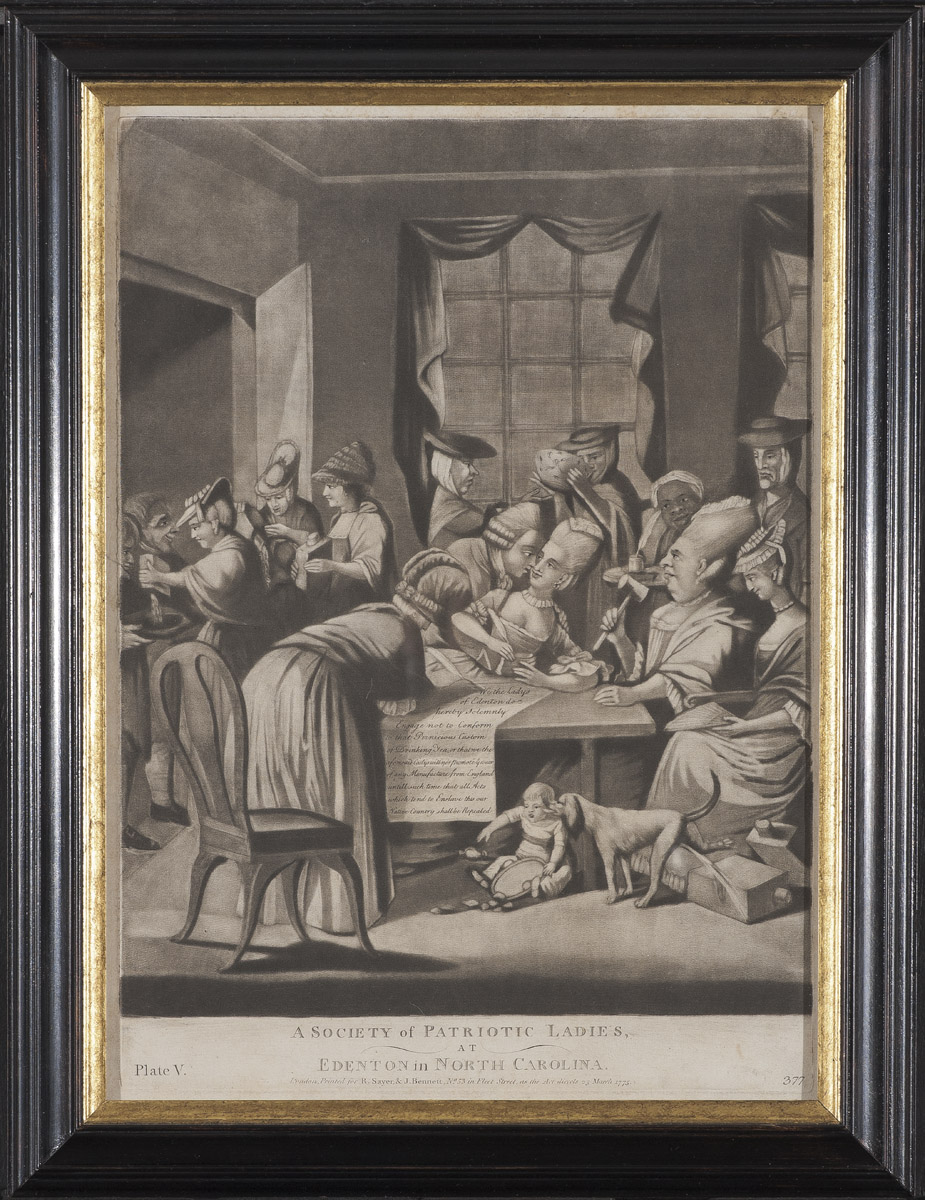
"A Society of Patriotic Ladies:" http://uncorked.winterthur.org/files/2012/01/1957_1255.jpg

Catalogued Huntington collections of CA hist: 60% are accessible to visitors. CA hist has often been taught about as if it existed by itself; much more appropriate to discuss it as it relates to the Pacific Basin, Mexico/New Spain, etc.
Karina White: The Huntington: 410,000 rare books, 7 million manuscripts, 1.3 million photos, prints, ephemera, 270,000 reference books. Henry Huntington, at his death in 1927, owned over 1 million books. Setting up new exhibit in Library Exhibition Hall.
Dr. Peter Blodgett: "Visions of Empire: The Quest for a Railroad across America, 1840-1880." The railroad changed the nation… basically carriages on rails. Bridges/viaducts changed the landscape (Carrollton Viaduct). The gold rush pushed development of not only the railroad, but economic development in other countries (Panama in particular) to provide quick ways to reach the gold fields across the continent. Primary source photographs, chronologically presented, make great storytelling tools to tell the history of the development of the railroad system and its impact on the west. The Great West Illustrated: an excellent source for large folio images of the west; each one approx. 11x14 in size. Frank Leslie's Illustrated Newspaper: Another great primary source.
Raul: Primary Source Analysis Tool (from Library of Congress): Can be adapted to match your grade level. Observe (see): what do you see? Reflect (think): What's the evidence? Question: What are other pieces of information you need?


Teacher's idea exchange:
Raul Almada (Whittier City, ralmada@whittiercity.net)
- Thanksgiving Break Primary Sources: A parent letter to send in the fall asking for "primary sources" from students for a class project.
Erica Cortes (Long Beach USD, ecortes@lbschools.net)
- Byrdseed: great for GATE students.
- California Weekly: great for enhancing CA hist. $300/class.
- Keeping History Alive: a grant through APU. Cool!
Patricia Garcia (UCLA Lab School, pgarcia@labschool.ucla.edu)
- Gold Rush lesson plan organizer (Click here for Word file; and here for a PDF). You'll need to download it to view or edit it.
Joshua Helpern (Tustin USD, jhelpern@tustin.k12.ca.us):
- Haiku web pages
- Storybird: story publishing
- Prezi: PowerPoint on steroids. Web based plus an iDevice app. Free. Use the templates for starters.
- Liberty's Kids: great cartoons on YouTube, plus a website with activities.
- Riley's Farm: field trip for 5th grade for revolutionary war and colonial times; gold rush as well.
- Dance Mat Typing: great for online typing lessons.
Heidi Kwalk (Los Alamitos, hkwalk@losal.org)
- NBCLearn: Website resource for teachers of different topics. They often have primary sources available.
Skip Rogers (Rowland USD. srogers@rowland.k12.ca.us)
- Kidblog: kids write online, can add photos, parents can see with a secure account. Cool! Free.
- Evernote: great for writing at home, at school, in the lab, on an iOS or Android device. Free.
- Haiku Deck: create simple, easy to read slides for use on an iDevice. Free.
- Google Apps for Education: set up email and Google drives for your students. There are several hoops to jump through to get this up and running, but way worth the effort. Free.
- Quizlet: create flashcards online, download them to your iDevice. It will even give them practice quizzes! You'll need a companion app like Flashcards Deluxe. Free for Quizlet; Flashcards Deluxe is $4.
- Socrative: create quizzes to use on iDevices; also records grades as an Excel spreadsheet. Free.
- Gene Autry Museum: great gold rush stuff. They also offer grants to help with bus costs.
- AllMyTube: YouTube downloader for Mac. If your district blocks YouTube, this is a great app to download YouTube videos to use on your computer offline. It can also convert videos to mp4 format to load onto iPods and iPads. $29.
- So Cal Museum links: a blog page I created last year, early summer, to encourage my students to visit museums over the summer. You can filter by location. Days and hours are listed, with a link to the museum's webpage.
- The Mountain: a very relaxing video I use to focus students before taking a big test. A little over 3 min. long.
- Gratitude: a great video on being thankful for the day you have before you. 6 1/2 min long.
- Volunteer Spot: great for scheduling parent volunteers and conferences.
- Flipboard: an app to pull web pages onto your iPad and view like a newspaper. Excellent, and free.
- Bitly: Here's a SUPER way to turn gigantic web addresses into short URLs for your students. Easy and free. That's what I used for this blog to go from http://prisourcehistca.blogspot.com to bit.ly/prisourcesca.
- PollEverywhere: Great for taking class surveys on iDevices. Web-based, so they can use any device, including the computer lab. Free for up to 30 students.
- FreeRice: A great sponge website for practicing all kinds of activities (grammar, math, languages, etc.); the more answers students get correct, the more rice grains get donated to a charity around the world.
- Teach your Monster to Read: Great phonics basics for ELD learners. Free.
Amy Terrell (Los Alamitos, aterrell@losal.org)
Heidi Kwalk (Los Alamitos, hkwalk@losal.org)
- NBCLearn: Website resource for teachers of different topics. They often have primary sources available.
Skip Rogers (Rowland USD. srogers@rowland.k12.ca.us)
- Kidblog: kids write online, can add photos, parents can see with a secure account. Cool! Free.
- Evernote: great for writing at home, at school, in the lab, on an iOS or Android device. Free.
- Haiku Deck: create simple, easy to read slides for use on an iDevice. Free.
- Google Apps for Education: set up email and Google drives for your students. There are several hoops to jump through to get this up and running, but way worth the effort. Free.
- Quizlet: create flashcards online, download them to your iDevice. It will even give them practice quizzes! You'll need a companion app like Flashcards Deluxe. Free for Quizlet; Flashcards Deluxe is $4.
- Socrative: create quizzes to use on iDevices; also records grades as an Excel spreadsheet. Free.
- Gene Autry Museum: great gold rush stuff. They also offer grants to help with bus costs.
- AllMyTube: YouTube downloader for Mac. If your district blocks YouTube, this is a great app to download YouTube videos to use on your computer offline. It can also convert videos to mp4 format to load onto iPods and iPads. $29.
- So Cal Museum links: a blog page I created last year, early summer, to encourage my students to visit museums over the summer. You can filter by location. Days and hours are listed, with a link to the museum's webpage.
- The Mountain: a very relaxing video I use to focus students before taking a big test. A little over 3 min. long.
- Gratitude: a great video on being thankful for the day you have before you. 6 1/2 min long.
- Volunteer Spot: great for scheduling parent volunteers and conferences.
- Flipboard: an app to pull web pages onto your iPad and view like a newspaper. Excellent, and free.
- Bitly: Here's a SUPER way to turn gigantic web addresses into short URLs for your students. Easy and free. That's what I used for this blog to go from http://prisourcehistca.blogspot.com to bit.ly/prisourcesca.
- PollEverywhere: Great for taking class surveys on iDevices. Web-based, so they can use any device, including the computer lab. Free for up to 30 students.
- FreeRice: A great sponge website for practicing all kinds of activities (grammar, math, languages, etc.); the more answers students get correct, the more rice grains get donated to a charity around the world.
- Teach your Monster to Read: Great phonics basics for ELD learners. Free.
- I-nigma and QRifier | Vec: great to create QR codes for students to read on their iDevices and go to a website quickly. (Skip's note: Also cool to use at Open House: students write a greeting for parents, you turn into a QR code, print it up and put on the students' desks. Parents read from phones! I use QRafter for to read, and QR Code Generator to actually make the notes. We then print up the code from here.)


No comments:
Post a Comment